The PlayStation 5 is designed to handle a wide range of devices through its built-in usb ports. For most players, these ports are the gateway to expanding storage, charging controllers, and connecting headsets or mice for compatible games. Knowing how to use the ps5 usb ports effectively can reduce load times, prevent power issues, and keep your setup organized during long gaming sessions.
Where the ps5 usb ports are located
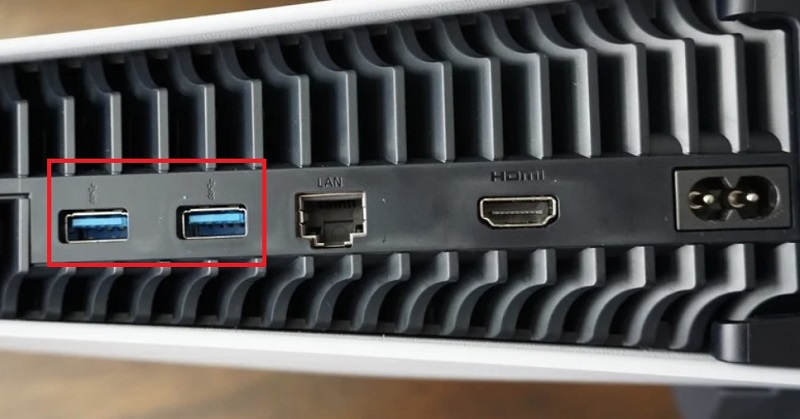
On the PS5, you’ll find multiple ports arranged for convenience and performance. The front panel includes one USB-C port and one USB-A port, making it simple to plug in a controller, a charging dock, or a quick-access drive. The rear of the console houses two USB-A ports, which are ideal for high-capacity external storage or accessories that don’t require frequent access. This layout offers a balance between accessibility and performance, enabling a fast response for peripherals while still accommodating larger storage devices. For a detailed breakdown and recommendations, you can read more at ps5 usb ports.
What you can connect and why
The most common uses for the ps5 usb ports include external storage, controller charging, and peripheral connectivity. External drives let you store PS4 games and media, freeing internal space for PS5 titles. Note that external drives can archive PS4 games and transfer them quickly, but running PS5 games from USB storage isn’t supported in the same way. If speed is a priority, opt for a USB 3.x external SSD, which minimizes loading times when launching compatible titles. You can also charge DualSense controllers, wireless headsets, or keyboards through these ports, though you’ll want to avoid non-powered hubs for high-demand devices to prevent power dips during gameplay.
Choosing accessories and hubs wisely
When expanding your PS5 setup, be mindful of bus power and bandwidth. A powered USB hub is often a safer choice if you plan to connect several devices at once, especially when you’re running external storage along with a headset and a controller charger. Unpowered hubs can experience voltage drop, leading to slower transfers or dropped connections. If you’re selecting a drive specifically for PS4 game storage or future-use PS5 compatibility, prioritize reliability, warranty, and bandwidth. In many cases, users report the smoothest experience with drives that explicitly advertise USB 3.x compatibility and robust enclosure cooling.
Tips to get the most from your usb ports
Format and organize drives properly. The PS5 supports exFAT-formatted USB drives, which is ideal for cross-platform use and large file sizes. Label drives clearly to avoid confusion between game storage and media storage. Always use a reputable enclosure and avoid putting drives in temperatures that could cause performance degradation. When connecting peripherals, test each device individually before adding a hub, and keep firmware and system software up to date to ensure compatibility with new accessories and games as they are released.
In short, the ps5 usb ports offer flexible options for storage expansion, charging, and peripheral support. By choosing appropriate drives and powered hubs, you can keep your console running smoothly and minimize interruptions during play. For more guides, product reviews, and updated tips, visit the FJREO homepage.